> For clean Markdown of any page, append .md to the page URL.
> For a complete documentation index, see https://akamai.ferndocs.com/llms.txt.
> For AI client integration (Claude Code, Cursor, etc.), connect to the MCP server at https://akamai.ferndocs.com/_mcp/server.
# Add the EdgeWorkers behavior
Use Property Manager to enable the behavior in your Akamai property configuration.
Adding this text in Github.
Before you begin, [Create an EdgeWorker ID](/edge-workers/create-an-edgeworker-id) so you can select it in EdgeWorkers behavior in Property Manager.
1. Navigate to your property in Akamai Control Center .
2. Click **Edit**.
3. Click **Add rule**.
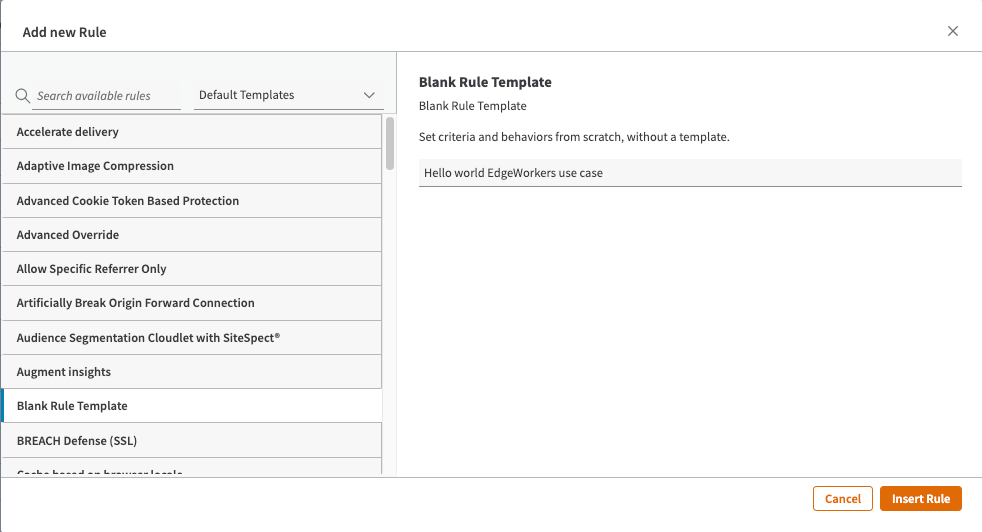 4. Enter a `name`.
5. Choose a `match criteria` and `scope`.
For more information about the available match criteria refer to the [Property Manager documentation](https://techdocs.akamai.com/property-mgr/docs/matches).
4. Enter a `name`.
5. Choose a `match criteria` and `scope`.
For more information about the available match criteria refer to the [Property Manager documentation](https://techdocs.akamai.com/property-mgr/docs/matches).
 > 📘 Scope defines which requests should have EdgeWorkers functions applied. By limiting the scope you can avoid unnecessary serverless hits, which can improve performance and reduce cost.
6. Search for `EdgeWorkers` in **available behaviors**.
> 📘 Scope defines which requests should have EdgeWorkers functions applied. By limiting the scope you can avoid unnecessary serverless hits, which can improve performance and reduce cost.
6. Search for `EdgeWorkers` in **available behaviors**.
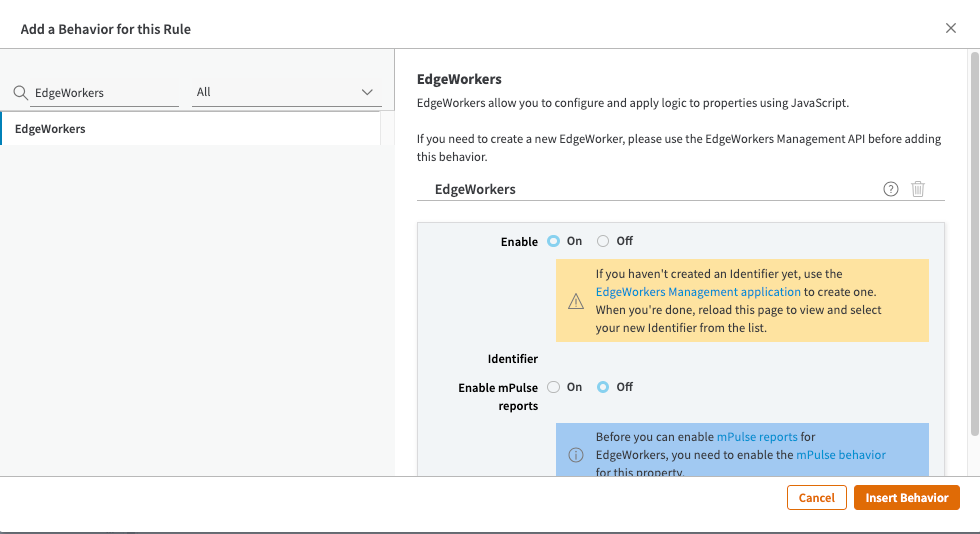 7. Change the setting to **On**.
8. Click **Insert Behavior**.
9. Select an EdgeWorker identifier from the list.
If you haven't created an EdgeWorker identifier, click the link in the information dialog. The EdgeWorkers Management application will open in a new window.
Once you have created your EdgeWorker identifier, close the window and reload the Property Manager Editor page. Now you can select the new EdgeWorker identifier from the list.
10. Save your property.
11. Click the **Activate** tab.
12. Click the **Activate on Staging** or **Activate on Production** button.
Once you've added the EdgeWorkers behavior in Property Manager follow the steps in the [Hello World tutorial](hello-world-edgeworkers-management-application.md). This section also includes details about how to Activate an EdgeWorker version on the staging or production network.
7. Change the setting to **On**.
8. Click **Insert Behavior**.
9. Select an EdgeWorker identifier from the list.
If you haven't created an EdgeWorker identifier, click the link in the information dialog. The EdgeWorkers Management application will open in a new window.
Once you have created your EdgeWorker identifier, close the window and reload the Property Manager Editor page. Now you can select the new EdgeWorker identifier from the list.
10. Save your property.
11. Click the **Activate** tab.
12. Click the **Activate on Staging** or **Activate on Production** button.
Once you've added the EdgeWorkers behavior in Property Manager follow the steps in the [Hello World tutorial](hello-world-edgeworkers-management-application.md). This section also includes details about how to Activate an EdgeWorker version on the staging or production network.