> For clean Markdown of any page, append .md to the page URL.
> For a complete documentation index, see https://akamai.ferndocs.com/edge-workers/mpulse/llms.txt.
> For AI client integration (Claude Code, Cursor, etc.), connect to the MCP server at https://akamai.ferndocs.com/_mcp/server.
# mPulse reports
mPulse is Akamai's real user measurement solution that provides near real-time feedback about how your site is performing. mPulse reports for EdgeWorkers include data about EdgeWorkers errors generated due to JavaScript errors. You can view the error reports in the mPulse dashboard.
> 📘 To use this feature you need to be part of an mPulse paid plan. For more information about setting up and using mPulse refer to the [mPulse guide](https://techdocs.akamai.com/mpulse/docs).
## Enable mPulse error reports for EdgeWorkers
1. Before you begin, make sure that your property includes the mPulse behavior and that you have followed the set up instructions described in the mPulse guide.
The mPulse behavior is enabled by default on some properties. If your property does not already include [mPulse](https://techdocs.akamai.com/property-mgr/docs/mpulse-beh) refer to the instructions in the [Property Manager guide](https://techdocs.akamai.com/property-mgr/docs/behs) for more information.
Once the mPulse-enabled property is active on the Akamai production network, your data (beacons) are directed to your mPulse app. See [How mPulse works](https://techdocs.akamai.com/mpulse/docs/how-mpulse-works) to learn more.
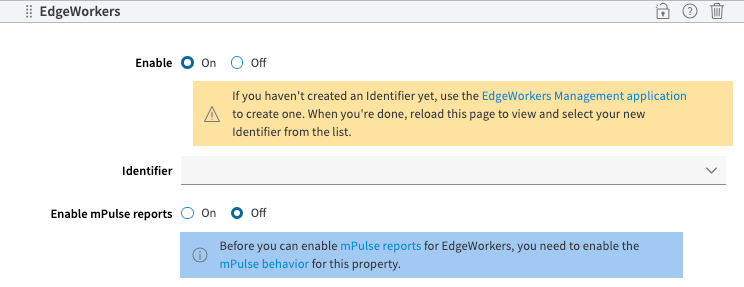
2. Next, use the toggle button in the EdgeWorkers behavior to set **Enable mPulse error reports** to **On**.
3. To stop generating the EdgeWorkers error reports in mPulse you can set the toggle button to **Off**.
> 📘 If mPulse is unavailable on your property you will be prompted to enable it before you can turn on the EdgeWorkers reports.
 ## View the EdgeWorkers error reports
EdgeWorkers functions produce an HTTP 500 response if the event handler generates errors due to:
- Unhandled JavaScript exceptions
- Exceeding limits such as CPU and memory
- Timeouts
- JavaScript syntax errors
1. Log in to [mPulse](https://mpulse.soasta.com/concerto/Central) to enable and view the EdgeWorkers error reports.
2. Select EdgeWorkers event handlers as an error source in the **App Error List** and **App Error Summary** dashboards.
Refer to the [Explore mPulse system dashboards and widgets](https://techdocs.akamai.com/mpulse/docs/explore-mpulse-system-dashboards-and-widgets) in the mPulse guide.
The mPulse error reports for EdgeWorkers include the following details.
| Parameter | Description |
| --- | --- |
| URL | URL related to the beacon
## View the EdgeWorkers error reports
EdgeWorkers functions produce an HTTP 500 response if the event handler generates errors due to:
- Unhandled JavaScript exceptions
- Exceeding limits such as CPU and memory
- Timeouts
- JavaScript syntax errors
1. Log in to [mPulse](https://mpulse.soasta.com/concerto/Central) to enable and view the EdgeWorkers error reports.
2. Select EdgeWorkers event handlers as an error source in the **App Error List** and **App Error Summary** dashboards.
Refer to the [Explore mPulse system dashboards and widgets](https://techdocs.akamai.com/mpulse/docs/explore-mpulse-system-dashboards-and-widgets) in the mPulse guide.
The mPulse error reports for EdgeWorkers include the following details.
| Parameter | Description |
| --- | --- |
| URL | URL related to the beacon
Refer to the [URLs](https://techdocs.akamai.com/mpulse-boomerang/docs/whats-in-an-mpulse-beacon#urls) section of the mPulse beacon description. |
| Error message and stack trace | Application (JavaScript and network) errors.
Refer to the [Errors](https://techdocs.akamai.com/mpulse-boomerang/docs/whats-in-an-mpulse-beacon#errors) section of the mPulse beacon description.
The EdgeWorkers mPulse report includes additional information in the form of a JavaScript stack trace. |
| EdgeWorkers data | EdgeWorker ID
EdgeWorker version
Name of the EdgeWorker ID |
| User-Agent | Includes fields from the [User-Agent HTTP Request Header](https://techdocs.akamai.com/mpulse-boomerang/docs/whats-in-an-mpulse-beacon#user-agent-fields) such as, browser family, major version, and device type. |
| EdgeScape data | Refer to **EdgeScape** in the [Akamai](https://techdocs.akamai.com/mpulse-boomerang/docs/whats-in-an-mpulse-beacon#akamai) section of the mPulse beacon description. |
| Edge Device Characteristics data | Refer to **EDC** in the [Akamai](https://techdocs.akamai.com/mpulse-boomerang/docs/whats-in-an-mpulse-beacon#akamai) section of the mPulse beacon description. |
| Property data | Includes the Property version, ARL ID, and CP Code.
Refer to **Akamai info** in the [Akamai](https://techdocs.akamai.com/mpulse-boomerang/docs/whats-in-an-mpulse-beacon#akamai) section. |
| mPulse session ID | Session ID generated by mPulse.
Refer to the [Session](https://techdocs.akamai.com/mpulse-boomerang/docs/whats-in-an-mpulse-beacon#session) section of the mPulse beacon description. |