

EdgeWorkers event model
Adding new text here.
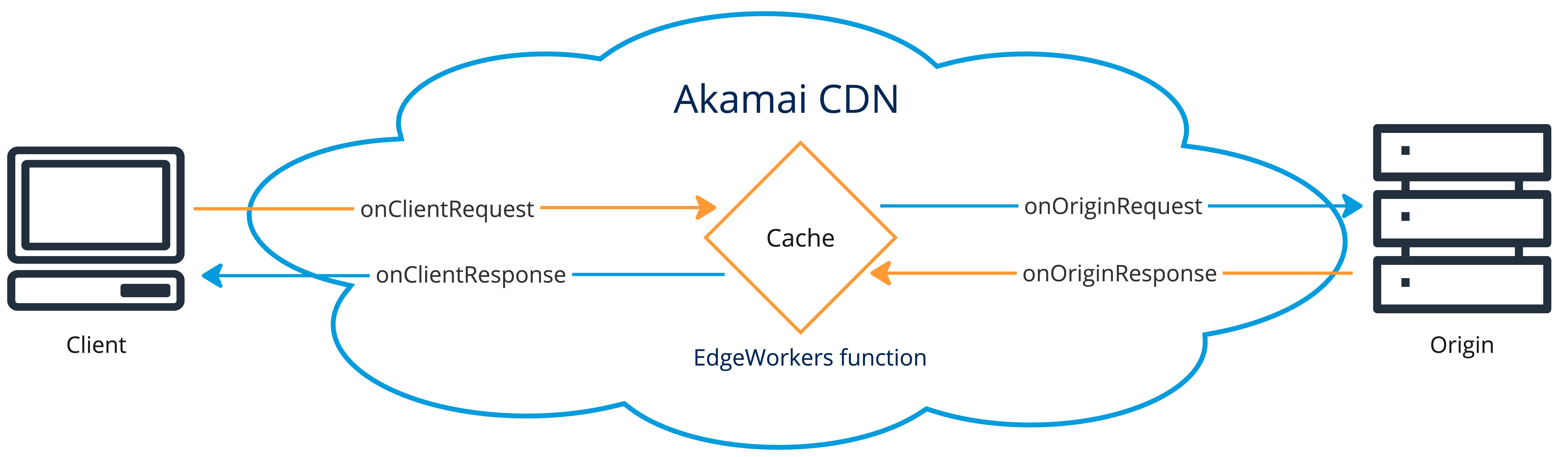
Understand when EdgeWorker scripts are executed. The EdgeWorkers code is invoked based on specific HTTP events. To create a function for any of these events, implement the callbacks as explained in the JavaScript API reference.
Adding text here in the Editor.
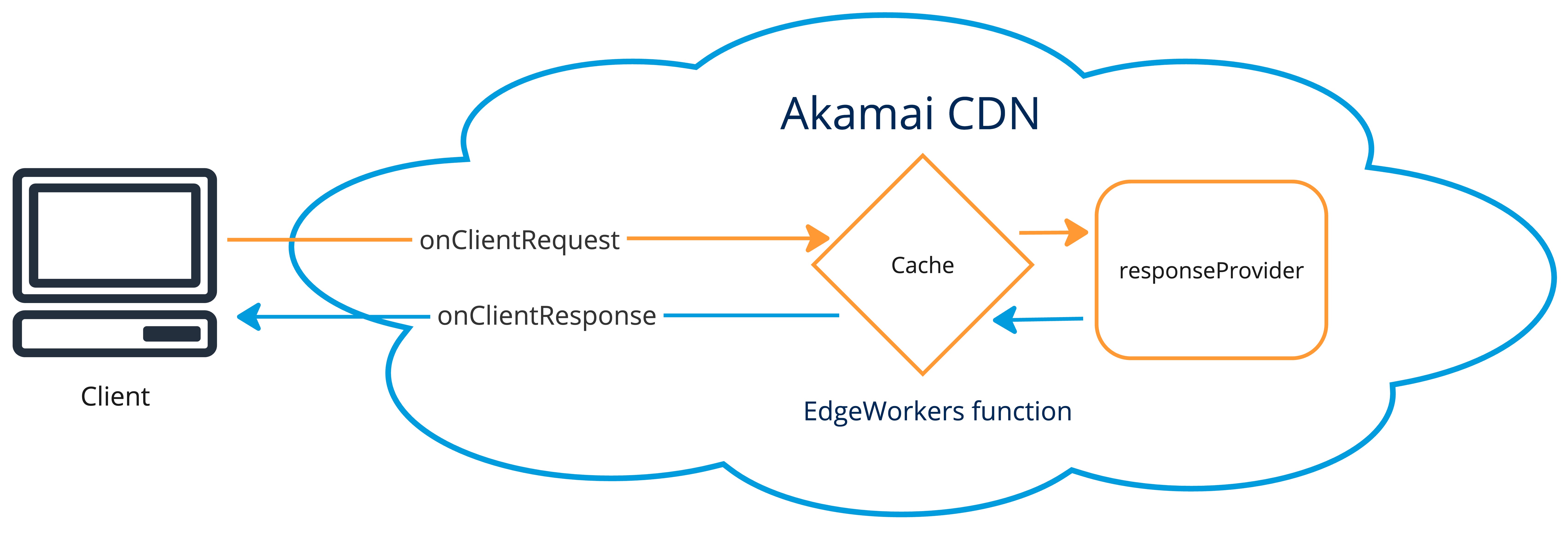
The responseProvider event handler acts as a surrogate origin to execute EdgeWorkers code. To learn more, go to the Response Orchestration section.
onClientRequest
The onClientRequest event happens for every request as the request is received, before checking if a response is available in cache. Use this event for request modifications before going to cache or to origin. Here’s an example of a function that modifies the response based on user location:
Review the table for information about the available parameters.
| Parameter | Type | Description | | :-------- | :----------------------------- | :------------------------------------------------------------------------------------------------------------------------ | | request | Request | An object representing the current request. Modifications to this request object are visible in all other event handlers. |
onOriginRequest
The onOriginRequest event happens just before sending the request to the origin. This event only happens if the response is not served from cache and not constructed on the edge. Use this event if you want to affect the response coming back from the origin. Changes to the Request Object made during onOriginRequest update the outgoing request to the origin. The changes are not visible in later event handlers.
This function adds a device type header to the origin request:
Review the table for information about the available parameters.
| Parameter | Type | Description | | :-------- | :---------------------------- | :---------------------------------------------------------------------------------------------------------------------------------------------------------------------- | | request | Request | An object representing the outgoing current request. Modifications to this request object are visible to the origin but not visible to any of the other event handlers. |
onOriginResponse
The onOriginResponse event happens as the origin response is created. The event only happens if the response is not served from cache and not constructed on the edge. Use this event if you want to modify the response before it is cached.
Review the table for information about the available parameters.
| Parameter | Type | Description | | :-------- | :------------------------------ | :----------------------------------------------------------------------------------------------------------------------------------------- | | request | Request | An object representing the current request after modifications by the onClientRequest event handler. | | response | Response | An object representing the current response. Modifications to the Response object are only visible in the onClientRequest event handler. |
onClientResponse
The onClientResponse happens before the response is sent to the client.
This example shows how to set a header before the response is sent to the client:
Review the table for information about the available parameters.
| Parameter | Type | Description | | :-------- | :------------------------------ | :------------------------------------------------------------------------------------------------------ | | request | Request | An object representing the current request, after modifications by the onClientRequest event handler. | | response | Response | An object representing the current response. |
responseProvider
The responseProvider event happens if the response is not already found in cache. This example shows how to return a response body:
📘 To find more information about how EdgeWorker scripts are executed during the
responseProviderevent see Response Orchestration.
Review the table for information about the available parameters.
| Parameter | Type | Description | | :-------- | :---------------------------- | :------------------------------------------------------------------------------------------------------------------------------------- | | request | Request | An object representing the incoming request. Modifications to this request object are visible in the onClientResponse event handler. |
Event handler methods
View the supported HTTP methods for the EdgeWorkers event handlers.
| Event handler | Supported methods | Unsupported methods | | --- | --- | --- | | onOriginRequest
onOriginResponse
onClientResponse
onClientRequest
responseProvider | GET
HEAD
POST
PUT
PATCH
DELETE
OPTIONS (see note below) | CONNECT
TRACE |
📘 To use the OPTIONS HTTP method you need to add the
PMUSER_EW_ENABLE_OPTIONSvariable to your rule and set the value totrue. The name of the variable must be UPPERCASE.
👍 Sub-requests support the
GET,HEAD,POST,PUT, andDELETEmethods.
Bypass event handlers
To prevent specific event handlers from executing you can create a Property Manager variable.
Refer to this table for the PMUSER_BYPASS variable name to use for each event handler and to see the metadata stage when it’s evaluated.
| Event handler | Variable name | Metadata stage evaluation | | :----------------- | :----------------------- | :------------------------ | | onClientRequest | BYPASS_EW_CLTREQ_EVENT | client-request | | onOriginRequest | BYPASS_EW_ORGNREQ_EVENT | forward-request | | onOriginResponse | BYPASS_EW_ORGNRESP_EVENT | forward-response | | onClientResponse | BYPASS_EW_CLTRESP_EVENT | client-response | | responseProvider | BYPASS_EW_RP_EVENT | client-request |
To bypass an event, set the initial value of the corresponding variable to “true”.
👍 The PMUSER_ prefix for the variable is automatically included.

EdgeWorkers event handlers are always bypassed if their respective PMUSER variables are set, no matter which metadata stage they are restricted to. You can use use BYPASS variables in a programmatic manner to:
-
Make decisions in later metadata stages when access to more information is available. For example, you can only execute
onClientResponseif a specific response header is present. -
Set the variables from within an EdgeWorkers event, to bypass later events.