Test Site Failover
To help provide the best possible user experience for your customers you should test your failover logic.
📘 When testing Site Failover you need to remove the
akamai-x-ew-debug-rpPragma header. For more information refer to the known issue.
Use code to generate failures
You can use the following code to generate various failure types. This code lets you add a query parameter to the URL to generate a status for, ExecutionError, CpuTimeoutError, and WallTimeoutError.
For example, you can add ?ew-error-onClientRequest=CpuTimeoutError to the url make the EdgeWorkers function exceed the CPU timeout limit and fail.
Add responseProvider to enhanced debug headers
When sending both the standard Pragma: akamai-x-ew-debug-rp request header and a valid enhanced debug header the response contains a multi-part response. The debug output for responseProvider is appended to the end of the body as the second part of a multi-part stream.
When enhanced debugging for responseProvider is enabled the following behavior changes also occur:
- Caching is bypassed to prevent the body with debug data from being stored in cache and delivered to other users.
AK_EDGEWORKERS_RP_STATUSwill always report success, preventingresponseProvidererrors from being detectable by Property Manager.
For more information see Enable enhanced debug headers for responseProvider.
Bypass failover for testing
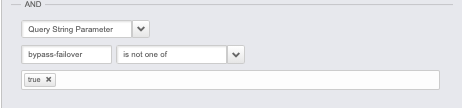
When testing and troubleshooting your EdgeWorkers code, you may want to bypass failover logic to see the original error and debug headers. It can be useful to bypass all Property Manager failover logic, including EdgeWorkers failover, if a specific query parameter is present.
For example, use the match condition below around the EdgeWorkers failover logic to see the original error if the query string bypass-failover=true is present.